I was reading through my blogs tonight and came across one that did a nice job of explaining the qualities that an agile team member should possess. In addition, the writer included a good behavioral interview question for each.
I briefly share each below, but I highly recommend reading the original article.
1. People Who Collaborate
"Think back to a recent project. Give me an example of a time you had to work with other people to make sure that you could finish something. What happened?"
2. People Who Ask for Help
"Think back to your most recent project. Tell me about a time you did not understand something. What did you do?"
3. People Who are Willing to Take Small Steps and Get Feedback
"When you work on your projects outside of work, how do you work?"
4. People Who are Willing To Do Something That is Good Enough for Now
"Tell me about a recent time you did not know everything at the beginning of the project. What did you do?"
5. Adaptable People
"Tell me about a time when you did not have the conditions you would've liked for your project. What did you do?"
6. People Willing to Work Outside Their Expertise
"Tell me about a time you took on work to help the team. What was that like?"
So, tell me dear Reader – what questions do you ask when interviewing candidates for an agile-oriented team?
Motivations
I found this video about what motivates people to be very refreshing. Basically, if the tasks that people are working on require more than a basic physical action, money rewards don't motivate, but rather demotivate people. What really motivates others to perform well at conceptual tasks are three things: autonomy, self mastery, and purpose. What I find is that Agile practices tend to foster or work within these motivations.
For example, user stories really help to zero in on the purpose for a given feature request. "As a [actor], I can [do something], so that I can [accomplish a goal]." Developers really get a sense for why they are building a piece of functionality rather than just focusing on building a method, etc. And the prioritization of these stories helps to clarify what is truly important within a sprint.
As well, agile practices promote mastery by emphasizing continual improvement. Teams are encouraged to use the processes that work for an individual team rather than trying to create a process that will work for an entire organization. Other principles such as refactoring and unit testing also suggest an intense focus on continually improving the code base.
And finally, the scrum meeting and agile planning in general focus on the team working together on deciding the priorities rather than having a central authority such as a PM do that. Individuals make themselves accountable to the team by explaining what they accomplished yesterday and what they plan to accomplish for the current day. This creates a sense of autonomy in those performing the work.
I would be interested to hear your thoughts on the video as well as whether or not you agree that agile practices help to foster these motivations.

Rick Warren Speaks on Meet the Press - Giving
I really enjoyed seeing Rick Warren, the pastor of Saddleback Church in California, speak on giving on Meet the Press with David Gregory. (below)
And what influence he has - not just because he has a platform on national television, but because he actually gives 90% of his income. He has the authority to speak on this subject!
Visit msnbc.com for Breaking News, World News, and News about the Economy
Static Code Analysis - Part 2
In my last post, I showed how you could enable static code analysis for a visual studio project. However, you can also set up static code analysis at a more global level if you are using Team Foundation Server for source code control.
Within a Team Project, you can set up a check-in policy that requires the code to pass static code analysis. You can do this by simply right-clicking on the Team Project and selecting Source Control from the Team Project Settings.
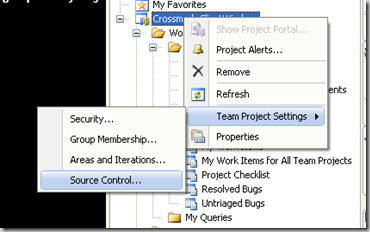
From the Source Control Settings dialog, click on the Check-In Policy tab. and click the Add... button. (Note - I already have the Code Analysis policy set for my project in the image below.)
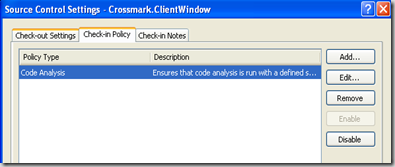
Click the Add... button to add a new check-in policy and select Code Analysis from the menu.

From here, you should be able set up the rules just as you would at the project level. Any rules you specify should generate an error when violated, and therefore, the code will not compile. As a result, the developers will not be able to check-in code that violates any of the rules that you have set for the team.

So, if you have already set up rules within your projects, another nice feature in Visual Studio is the ability to synch up your settings in each project with those set at the check-in policy level. You can do this by selecting the Replace with Check-in Policy under Analyze/Code Analysis Settings for Solution in Visual Studio.

All of the settings in your current projects will match those set at the Team Project level. None of your previous suppressions attributes should have been removed.
Hope this helps!
Static Code Analysis - Part 1
The static code analysis within Visual Studio is a great way of automating initial code review. In order to turn it on do the following.
1. Go to Properties within the particular project.
Code analysis can only be enabled at the project level, so the first step is to go to your properties section of each project you want enabled for code analysis.
2. Go to the Code Analysis tab.
3. At the top, check the box that "Enable Code Analysis on Build..."
4. On the right-hand side of the screen, check the box for those rules that you want treated as an error. (By default it is treated as a warning and will not stop the build process.)

Sometimes the rules may not make sense for projects where a lot of code is auto-generated. In this case, you could leave that rule as a warning in the project settings.
In other cases, you may want to suppress the errors for particular members of your types or for whole namespaces. This can be done by right-clicking on the rule violation in the Error List that appears when compiling your project and selecting a Suppress Message option.

As seen above, this can either be set within your source or in a project suppression file. You can learn more about this here.
Subscribe to:
Posts (Atom)